What Are GPS Spoofing Apps Actually Doing?
There are a lot of GPS spoofing apps on the market, each looking a little different from the other, but almost all doing pretty much the same thing. In Android, there is only one way to spoof your device's GPS (without rooting), and that's to use Android's built-in Mock Location API located in Developer Options. In Android 6.0 and above you select the specific app you would like to use. In older versions, it's just a simple checkbox that enables mock location mode for any app on your device.
So once you select a mock location app and start it up, what happens? What data is that mock location app mocking for you? In short, there are 5 variables that the Mock Location API asks for to mock your location: latitude, longitude, altitude, speed, and accuracy. Typically, most apps just change the latitude and longitude values to change your GPS location to some place in the world. But what about the other 3 values (altitude, speed, and accuracy)? Surprisingly, almost all GPS spoofing apps set these values to some constant number, whether it's 0, 1, or some random number, it's a value that remains the same. Some apps do give the user the option to set these values via settings, but even then, the number never changes when the user is actively using the app and changing their location.
The only exception to this is GPS JoyStick. It is the only app in the Google Play Store that actually mocks realistic, always-updating data for all necessary GPS values.
Real GPS
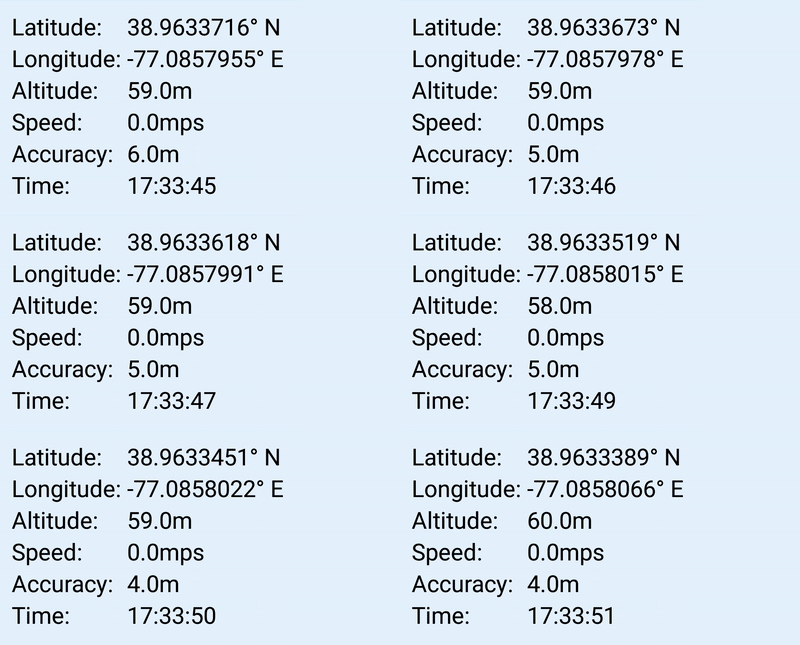
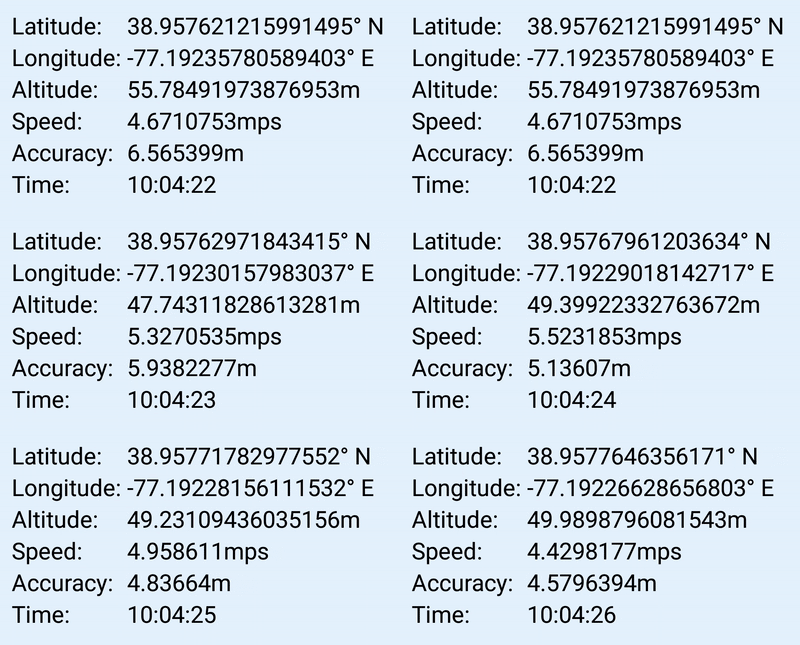
Section titled “Real GPS”When your real GPS reports values to your phone, it returns latitude and longitude to pinpoint your location, it returns your current altitude and speed if you're moving, and it returns an accuracy (in meters) of how accurate it believes those values are. Even the best phones rarely return an accuracy of 1 meter and they definitely don't return a constant, never-changing speed or altitude value. Actually, all values fluctuate every second when you're moving. And even when standing still, your latitude and longitude values don't remain the same. This is because your GPS is constantly attempting to pinpoint your location and it changes slightly every time. Furthermore, when you move from one location to another, because your GPS is always fluctuating your actual location, you never travel in a straight line. If you were to imagine traveling from one end of a road to the other, the GPS would report a subtle zigzag from start to finish.
Here's what real GPS values look like when being reported through a typical GPS reader app:
Device GPS While Stationary:
Device GPS While Moving:
Spoofing Apps
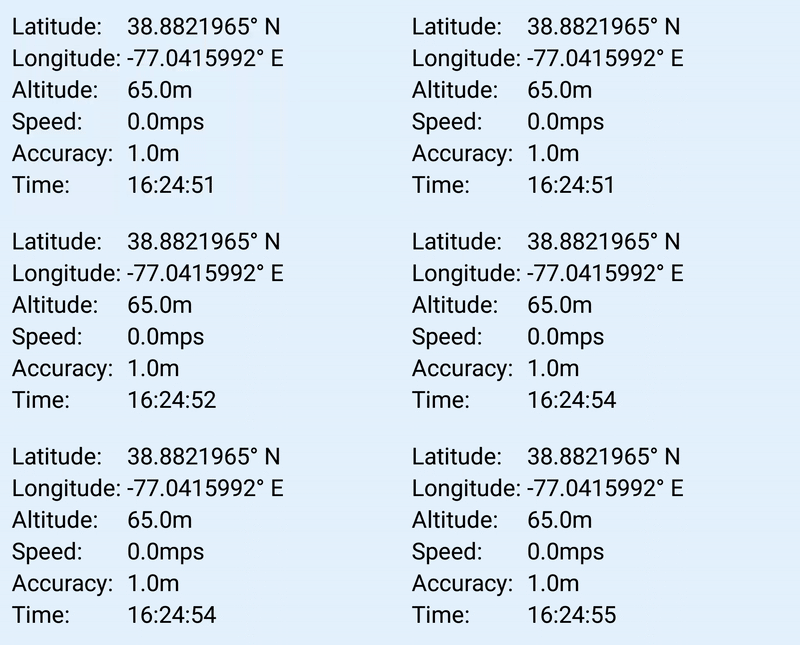
Section titled “Spoofing Apps”So if that's what a real GPS looks like, what do spoofing apps look like? Sadly almost all GPS spoofing apps show a constant reading when not moving, and even when the app is simulating movement, only the latitude and longitude values update. If you are skeptical of your favorite spoofing app, download any GPS reading app and try it yourself.
Typical Spoofing App While Stationary:
Typical Spoofing App While Moving:
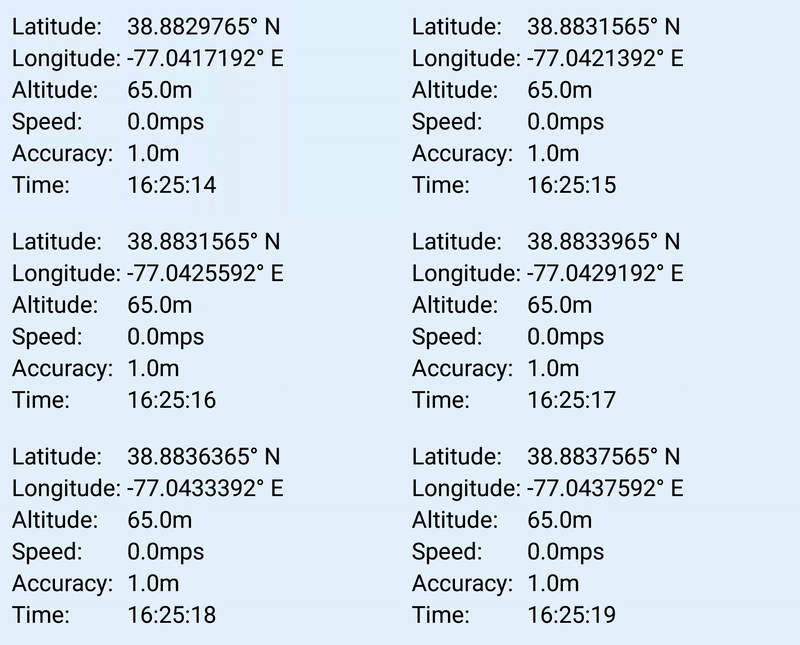
Notice how the altitude, speed, and accuracy never change. And to make it more ironic, the speed value remains at 0 even when you are moving. And you can probably guess, if the spoofing app simulates any type of movement for you, whether it's through a joystick or route option, it would report locations in a perfect straight line from the starting point to the end point, which is definitely not the way a real GPS works.
GPS JoyStick
Section titled “GPS JoyStick”So if that's the case, then the majority of apps on the market fail to satisfy how real GPS reports values as mentioned above. Luckily, there is one app that actually emulates what a real GPS should report: GPS JoyStick.
It is the only app in the Google Play Store that actually mocks realistic, always-updating data for all necessary GPS values. And all of those values are customizable via the Settings page. In almost all cases, the default values work perfectly for simulating real GPS values. Combined with features like favorites, routes for teleporting and automated walking, and the teleport dialog for entering any latitude-longitude coordinates, GPS JoyStick covers the full range of location spoofing workflows. It's a free app and available now on the Google Play Store.
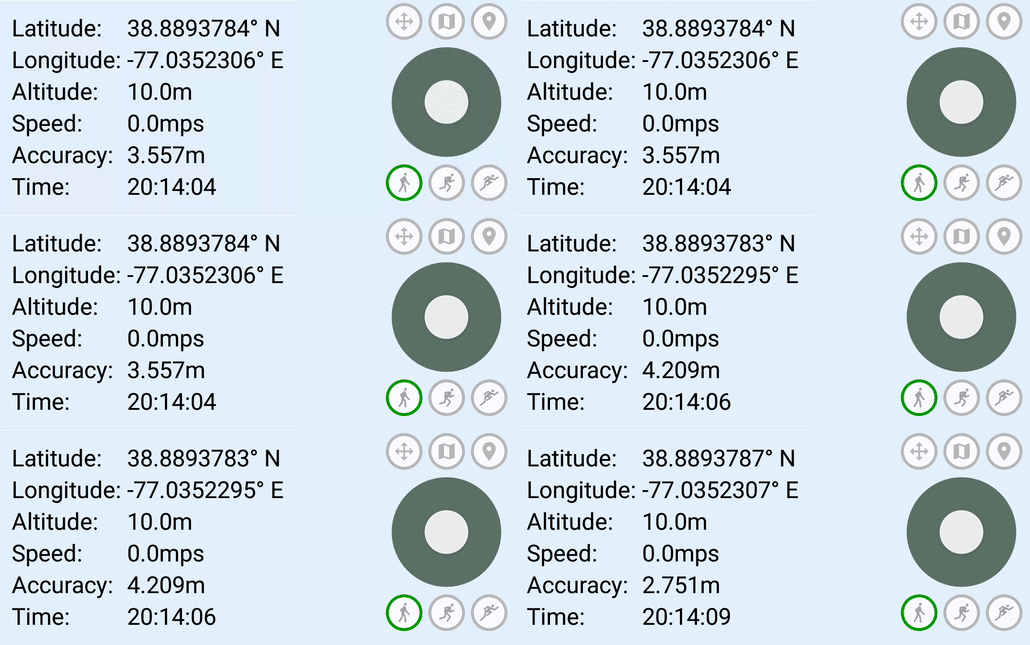
GPS JoyStick While Stationary:
GPS JoyStick While Moving:
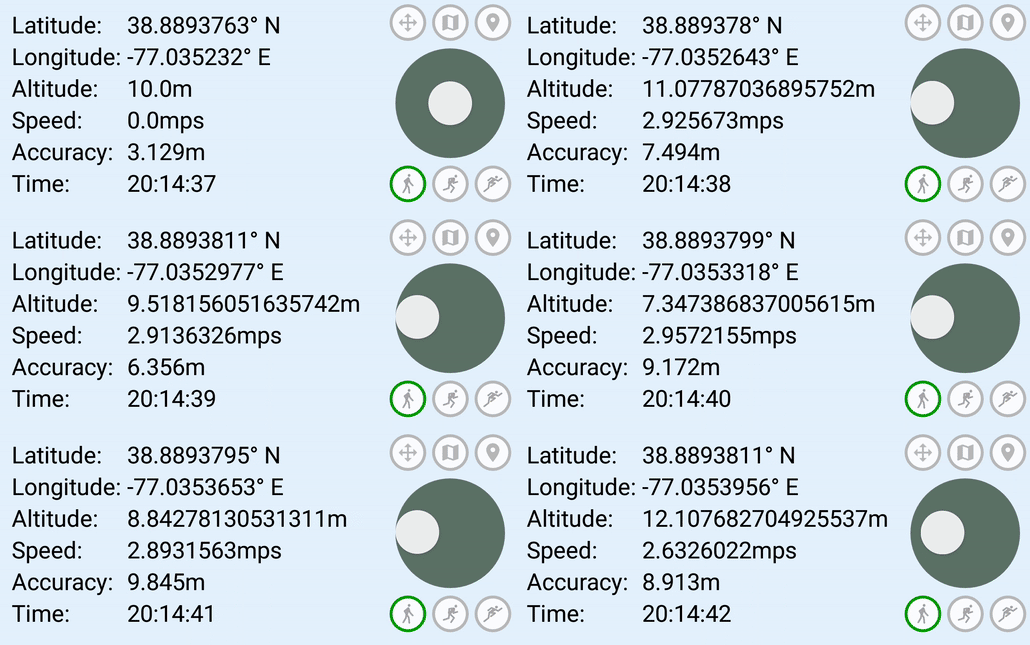
Notice the slight fluctuations in latitude, longitude, and accuracy while not moving. And when simulating movement, the speed and altitude also started changing. This is exactly how your device's GPS works. As it stands, there are no apps out there that emulate a real GPS to this degree and detail.
But Does It Matter?
Section titled “But Does It Matter?”Now this begs the question, does any of this matter? If all you need is latitude and longitude to change your location and it successfully works to trick whatever app you want to trick, then does it matter that the app is also reporting some random (never-changing) numbers for altitude, speed, and accuracy? The answer is, it depends. For some apps no, it doesn't matter. But for others, like popular location-based games, it probably does. A lot.
Location-based augmented reality games took the world by storm, forcing players to physically walk to specific locations to interact with in-game content. But with all games, there are always people who don't have the ability, time, or option to play as intended. Many players simply did not live near places required to truly enjoy these games. As a result, we saw a flood of GPS spoofing apps hit the app stores to satisfy the needs of players who just weren't able to travel to the required locations.
Location-based game and fitness-app developers have built increasingly sophisticated location-verification systems over the years: behavioral analysis, Play Integrity checks, and multi-layered signal analysis that goes well beyond simple mock-location flags. Their verification methods analyze patterns in GPS data. If location data from a device always returns the same altitude no matter where it is in the world, or reports constant speed and accuracy values, that's a strong signal. The point remains: spoofing apps that report static, unrealistic GPS values are far easier to distinguish from real hardware than those that simulate realistic sensor behavior.
So What Should We Do?
Section titled “So What Should We Do?”The most valuable use of a realistic-GPS simulator is to produce test data that exercises the same code paths as a real device. Move at realistic speeds, follow plausible paths, and leave realistic intervals between position jumps. Your test harness should mimic how a real user moves, not because it would otherwise trip a verification system, but because it's the only way your QA data will actually catch bugs that real users will hit. In other words, move at reasonable speeds, stick to the road/path, and don't teleport far distances unless the appropriate amount of time has passed (i.e. if the last logged location was San Francisco and you want to teleport to New York, then you should wait ~7 hours before teleporting).
See the GPS JoyStick download page for installation options.